In the fast-paced world of digital content, creators are constantly seeking ways to maximize their efforts and reach wider audiences. What if you could transform your existing YouTube videos into polished, SEO-ready blog articles with just a few clicks? Enter Video to Blog, an AI-powered tool that promises to do exactly that. This innovative software is designed to streamline content creation, turning video scripts and discussions into engaging written content complete with visuals, links, and metadata in a matter of seconds.
What is Video to Blog?
At its core, Video to Blog is an AI content repurposing tool available on AppSumo. Its primary function is to take the audio and visual information from a YouTube video and convert it into a well-structured, readable blog post. The process is designed for ultimate simplicity, aiming to save content creators, marketers, and business owners significant time and effort.
The fundamental value proposition is clear: leverage the work you’ve already done on video platforms and extend its lifespan and reach through written content. This approach taps into different audience preferences—some prefer watching, while others enjoy reading—and can significantly boost your SEO by providing search engines with rich, text-based content related to your video topics.

The Astoundingly Simple Process
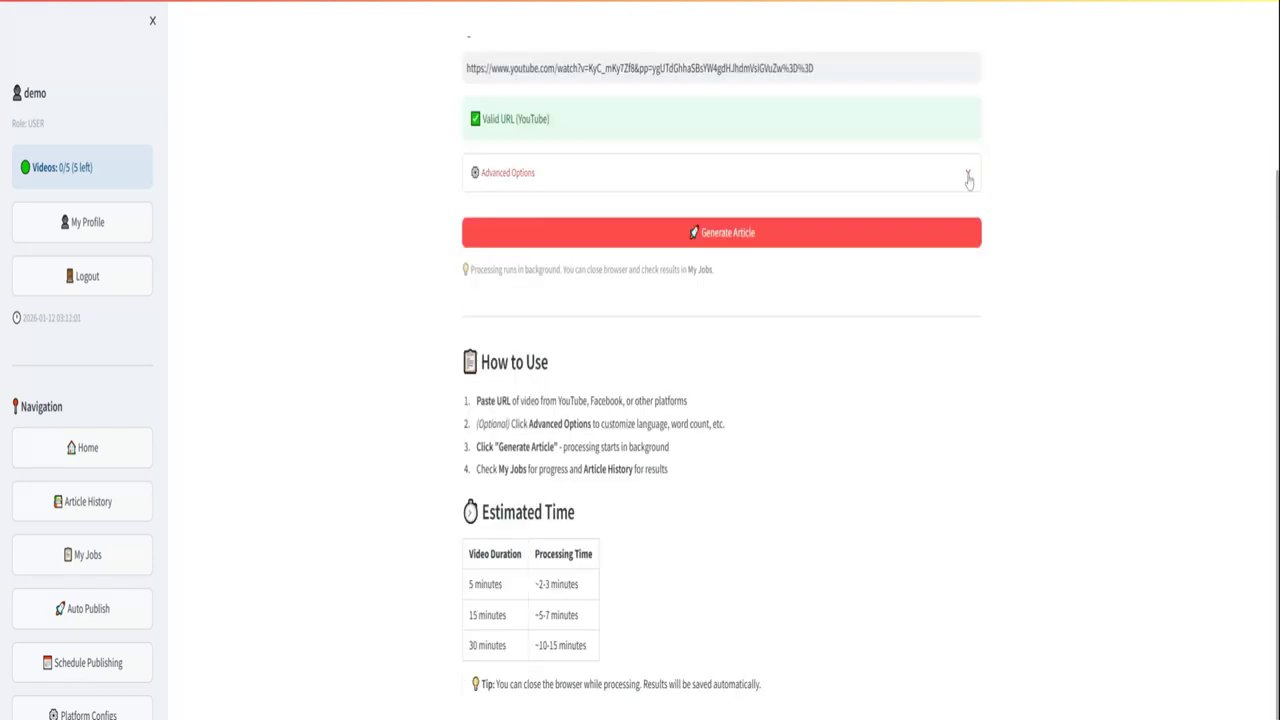
The standout feature of Video to Blog is its user-friendly workflow. The company emphasizes that when they say it’s easy, they mean it. The basic process to generate a blog from a video can be broken down into just two essential steps:
- Paste the URL: Copy the link of your target YouTube video.
- Click “Create Blog”: Initiate the AI processing with a single click.
Within seconds, the tool generates a complete draft. This isn’t just a raw transcript; it’s a well-structured and readable piece of content that’s ready to publish after a quick review. This foundational capability alone can transform a content strategy, allowing for rapid publication of written counterparts to video series, tutorials, or vlogs.

Beyond the Basics: Advanced Customization and Features
While the one-click creation is impressive, Video to Blog truly shines when you explore its advanced options. This is where you move from generating generic content to crafting a blog post tailored to your specific brand and goals. The level of control offered is extensive:
- AI Model & Output Control: Users can select their preferred AI model for generation, customize the target word length of the article, and choose the output language.
- Premium Transcription: For the highest quality results, there’s an option for premium transcription, which ensures greater accuracy in the initial conversion from speech to text, leading to better final content.
- Tone and Perspective: The tool allows you to customize the tone of the written piece and select the point of view (e.g., first-person, third-person), ensuring the blog post matches your brand voice.
- Automated Enrichment: One of the most powerful aspects is the tool’s ability to automatically pull relevant links from the video’s description and generate crucial SEO metadata, including titles and descriptions.
- Content Expansion: It can automatically create promotional copy for email and social media campaigns based on the new blog content, a huge time-saver for marketing.
- Structural Elements: The AI can generate a table of contents for longer pieces, compile a relevant FAQ section, and add a custom footer.
- Visual Assets: Perhaps one of the most valuable features for bloggers is the automatic inclusion of visuals. Video to Blog can add video screenshots, AI-generated images, and even integrate stock photos to break up text and make the article more engaging.
For those with very specific needs, an “additional instructions” box lets you give the AI direct commands, guiding it to include certain points, emphasize particular topics, or follow a unique format.
Polishing and Publishing Your AI-Created Content
Creating the draft is only half the battle; ensuring it’s high-quality is essential. Video to Blog includes a “Content Analyzer” feature for this critical stage. Before publishing, the AI will scan your blog post and provide analysis on several key fronts:
- Readability: Is the text easy to understand for your target audience?
- AI Detection: Offers insights, helping you ensure the content feels natural.
- Content Structure: Evaluates the flow and organization of the article.
- Key Phrase Scores: Analyzes the use and placement of important keywords for SEO.
Once your content is polished and ready, Video to Blog offers a robust suite of sharing and publishing options. You aren’t locked into the platform. You can export your work via public shareable links, or download it as HTML, a Word document, or a PDF. For direct publishing, it integrates seamlessly with platforms like WordPress and Blogger, and can facilitate posting to social media channels. This end-to-end workflow means you can go from a video idea to a published, promoted blog post in a fraction of the traditional time.
Conclusion: A Game-Changer for Content Creators
Video to Blog presents a compelling solution for anyone looking to scale their content output efficiently. By repurposing video content into written form, it helps you reach new audience segments, improve your website’s SEO, and extract maximum value from every piece of content you create. The combination of dead-simple operation, deep customization for brand alignment, and powerful built-in tools for analysis and publishing makes it more than just a transcription service—it’s a comprehensive content repurposing assistant.
The key takeaway is clear: in a world where content is king, efficiency is queen. Tools like Video to Blog empower creators to work smarter, not harder, by breaking down the barriers between different content formats. If you’re regularly producing video content and want a faster, more effective way to build a library of engaging written articles, this AI tool offers a promising and powerful path forward.