In the fast-paced world of digital content, creators are constantly seeking ways to maximize their reach and efficiency. What if you could transform a single YouTube video into a polished, SEO-ready blog post in mere seconds? Enter the new wave of AI-powered tools designed to do exactly that. This article explores one such solution, Video to Blog, and how it can streamline your content creation workflow, turning your video efforts into powerful written assets.
The Content Repurposing Challenge
For marketers, educators, and creators, video content is king. It’s engaging, personal, and highly consumable. However, a significant portion of your audience prefers written content—whether for quick scanning, in-depth reading, or accessibility reasons. Repurposing a video into a blog post manually is a time-consuming process involving transcription, editing, formatting, and SEO optimization. It often gets pushed to the bottom of the to-do list.
This is where AI steps in to bridge the gap. Tools like Video to Blog promise to automate this tedious conversion, promising not just a raw transcript, but a fully-formed article. The core proposition is powerful: extend the lifespan and reach of your video content by effortlessly transforming it into a different, equally valuable format.

How Video to Blog Works: Simplicity Meets Power
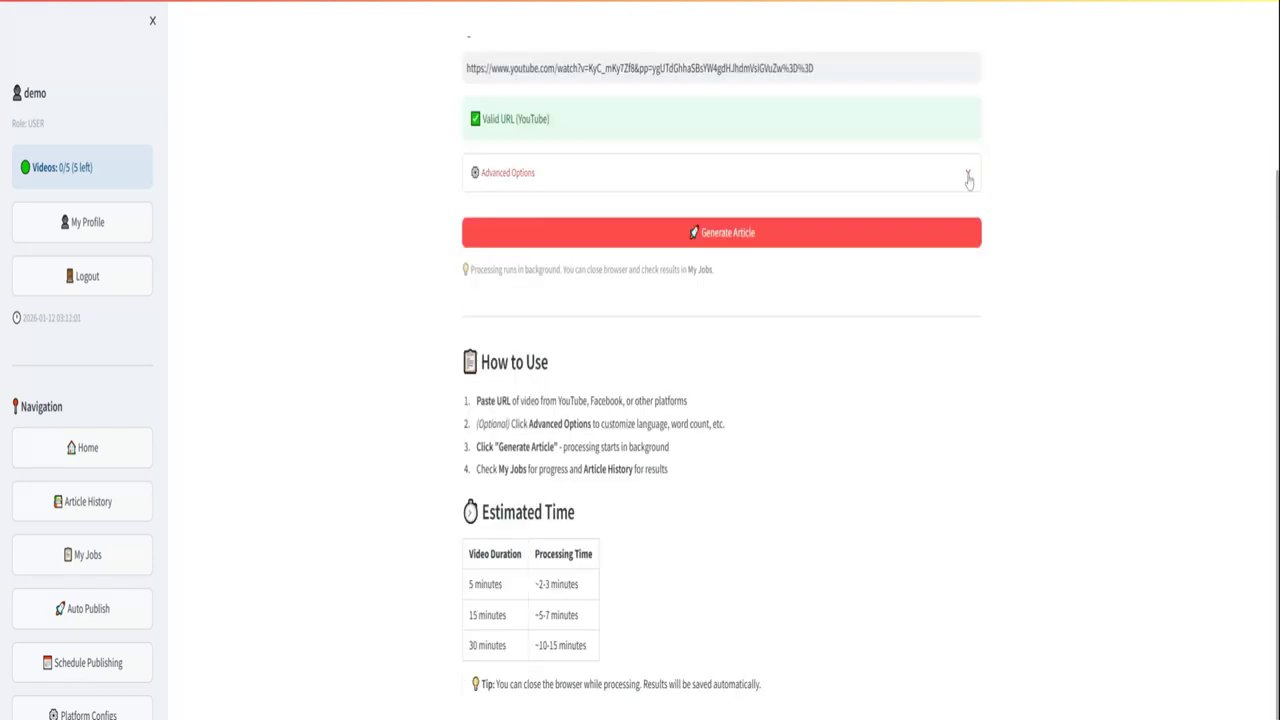
The process is designed to be remarkably straightforward, removing technical barriers for users of all skill levels. According to the demonstration, it boils down to a simple copy-and-paste action.
- Paste the URL: You start by copying the link to your YouTube video.
- Click “Create Blog”: With one click, the AI engine gets to work.
- Receive Your Draft: In just a few seconds, you are presented with a well-structured and readable piece of content that’s ready to publish.
This basic workflow delivers immediate value, but the true strength of the tool lies in its advanced customization options. Before generating your content, you can fine-tune the output to match your specific needs.
- AI Model Selection: Choose from different AI models, potentially balancing speed, cost, and output quality.
- Content Specifications: Customize the word length and select the language for your final blog post.
- Premium Transcription: Opt for a higher-quality transcription service to ensure the AI has the most accurate text from your video to work with, leading to a better final article.
- Tone and Point of View: Tailor the voice of the article. You can make it professional, conversational, enthusiastic, or anything in between, and switch between first-person, second-person, or third-person perspectives.

Beyond the Blog: A Suite of Content Creation Features
Video to Blog appears to be more than just a simple converter; it’s positioned as a comprehensive content repurposing suite. Once the AI generates the initial blog draft, a suite of features helps you enhance, optimize, and distribute it.
Automatic Enrichment
The tool automatically pulls in elements to make the blog post robust and visually appealing:
– It extracts links from the video’s description and incorporates them contextually.
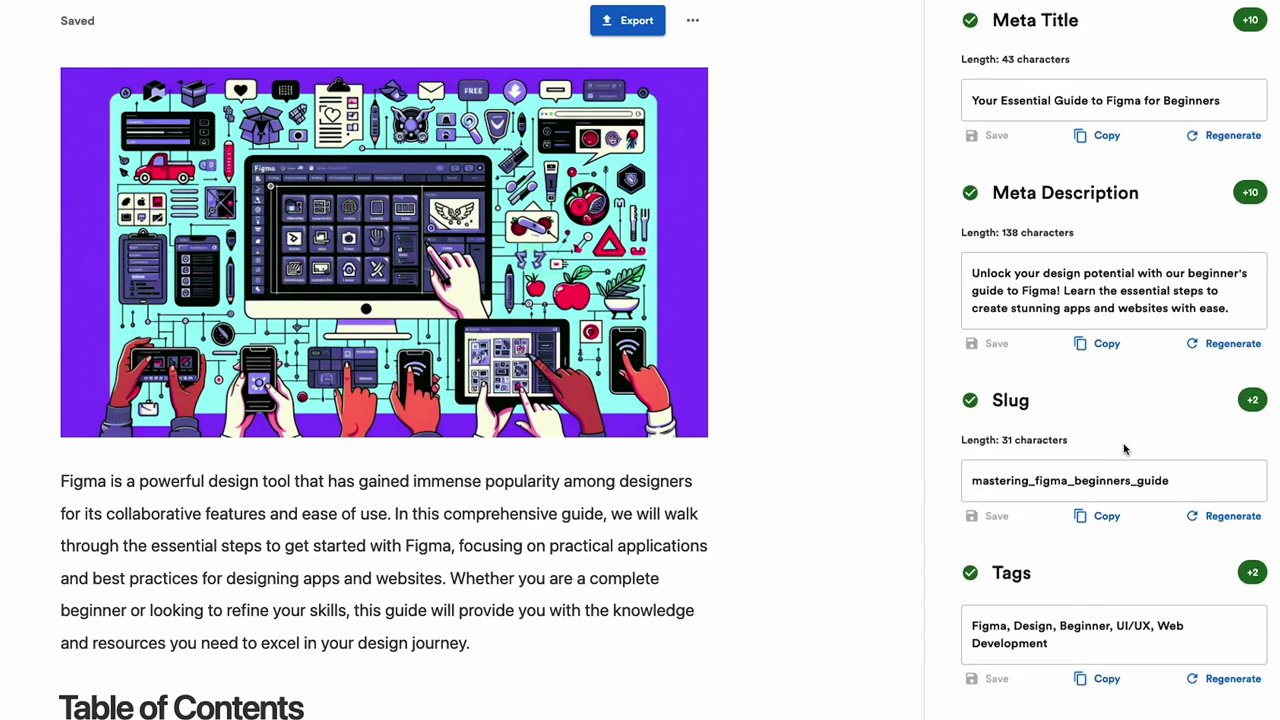
– It generates SEO metadata, including title tags and meta descriptions, crucial for search engine visibility.
– It can create promotional copy for email newsletters and social media posts to help you announce your new content.
– It builds a table of contents for easy navigation and even drafts a FAQ section based on the video content.
– You can add a custom footer for branding or calls-to-action.
Visual Asset Integration
A blog post without visuals can fall flat. This tool addresses that by automatically adding relevant images:
– Video Screenshots: Captures key moments from your video to use as inline images.
– AI-Generated Images: Creates unique visuals based on the content of your video.
– Stock Images: Pulls in relevant, high-quality stock photos to break up text and illustrate concepts.
Final Polish and Publishing
Before you hit publish, the tool offers a crucial step: the Content Analyzer. This feature reviews your draft for:
– Readability
– AI Detection (helping to ensure the content feels natural)
– Content Structure
– Key Phrase Scores for SEO
Once your article is polished, sharing and publishing are streamlined. You can export via public links, HTML, Word documents, or PDFs. For the ultimate in efficiency, you can publish directly to platforms like WordPress, Blogger, and various social media channels, all from within the tool.
Strategic Advantages for Content Creators
Adopting a tool like this isn’t just about saving time; it’s about implementing a smarter content strategy. Here’s how it can transform your approach:
Maximized ROI on Content Creation
You invest significant effort in scripting, filming, and editing a video. Repurposing that single asset into a blog post, social snippets, and email promos means you get more value from the same initial work. It’s a force multiplier for your creative energy.
Enhanced SEO and Discoverability
Google crawls text, not video. A well-optimized blog post derived from your video transcript makes the knowledge and keywords within your video discoverable via search engines, driving a new audience to your content who may never have found your YouTube channel.
Accessibility and Audience Preference
Providing a text-based alternative makes your content accessible to those who are deaf or hard of hearing, and caters to users who prefer reading over watching. It also serves as a perfect reference guide for viewers who want to revisit specific points you made in the video.
Consistent Multi-Channel Presence
Maintaining an active blog and social media presence requires a constant stream of content. This tool helps you fill that calendar consistently by leveraging the video content you’re already creating, ensuring your brand remains visible across all platforms.
Conclusion: Is AI-Powered Repurposing the Future?
The demonstration of Video to Blog paints a compelling picture of the future of content creation. The ability to seamlessly convert a dynamic video into a structured, visually-rich, and SEO-optimized article in minutes addresses a genuine pain point for modern creators and marketers.
The key takeaways are clear:
– Efficiency is Paramount: The tool drastically reduces the time and effort required to repurpose content.
– Quality is Not Sacrificed: With options for premium transcription, tone customization, and a content analyzer, the focus is on generating usable, high-quality output, not just raw text.
– Strategy is Enhanced: It enables a more holistic content strategy where one core asset can be effectively adapted for multiple channels and audience preferences.
While the final human touch for proofreading and brand alignment remains essential, AI tools like this are becoming powerful co-pilots in the content creation journey. For anyone looking to scale their content output, improve their SEO, and get more value from every video they produce, exploring AI repurposing tools is no longer a luxury—it’s a strategic next step.